
A typical mathematical coloring picture is assigned like this:
|
|
|
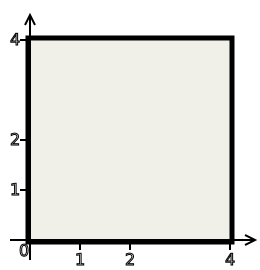
On the left we see a grey canvas with a prominent border, in this case the canvas is a square. We also see the given coordinate system, in this case it is the Carthesian system whose origin is in the lower-left corner of the canvas. Draw this canvas on your paper, unless you decided to try the interactive application. In the full version we show the canvas white so that you can print it. The aim is to put the right colors on this canvas.
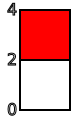
On the right we see the specifications that determine colors in the picture.
In order to find the color of a specific point of the canvas, we
substitute the coordinates of this point into the given coloring function ƒ,
then we find the resulting value on the color chart and this determines the
right color for this point. For instance, substituting the point (0,3)
we find that
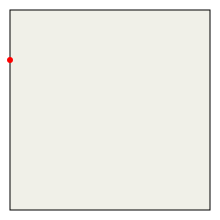
The basic strategy is based on the hope that the coloring function is reasonable, and thus the given canvas partitions into regions of reasonable shape with each having its own color. In order to determine the color of a certain region we simply pick some point from its interior, find its color in the way described above and then color the whole region in this color.
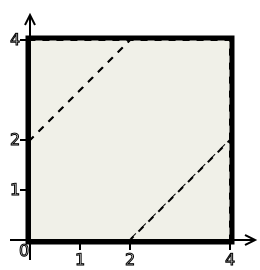
The assignment for the basic version of a picture also indicated the borders between the colored regions:
 |
|
|
Thus it is enough to determine the color for each of the regions. In the
middle strip we can pick, say, the point (1,1). We compute
In the lower-right triangle we find, say, the point (3,1/2).
We evaluate
In the upper-left triangle we may try the point (1/2,3).
We find that
We get the picture
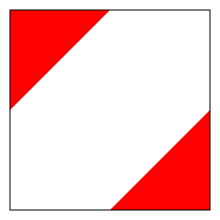
Trick: The red lies at the end of the color chart, so we can imagine that it
extends further. This allows us to choose a point that lies on the outer
border of the triangle (but not on the border between the triangle and the
neighboring strip), for instance the point (4,0). The we evaluate
The full version only shows the canvas, determining the borders between
regions is up to us. The starting points is the borders between colors in
the color chart. In our example we see just one border, namely between white
and red, and it happens when the value of the function ƒ is equal to two.
This sets up the equation of a curve
We obtained equations determining two straight lines, exactly the lines that we have seen marked in the basic version. If there are more colors in the chart, then we also have more borders and more curves to draw.